
Chatingly enters a space where users care less about polished profiles and more about speed, access, and the ability to start talking to strangers in seconds. It is generally understood as a random video chat platform built around quick matching, short live conversations, and a simple cam-to-cam chat experience.


That is exactly why platforms in this category keep getting attention. Many users are not looking for a dating app with long bios, endless swiping, and slow replies. They want a direct way to chat with strangers online, skip when a conversation is not a fit, and keep moving. Chatingly is usually evaluated in that same lane, alongside other Omegle alternative-style platforms and roulette chat services.
This review explains what Chatingly is, how it works, what users should expect around anonymity and moderation, and where caution still matters. It also covers the likely free vs paid experience, compares Chatingly with other platforms, and gives practical advice for readers who want a random video chat option without unrealistic expectations.
Last Updated: February 2026
What Is Chatingly?
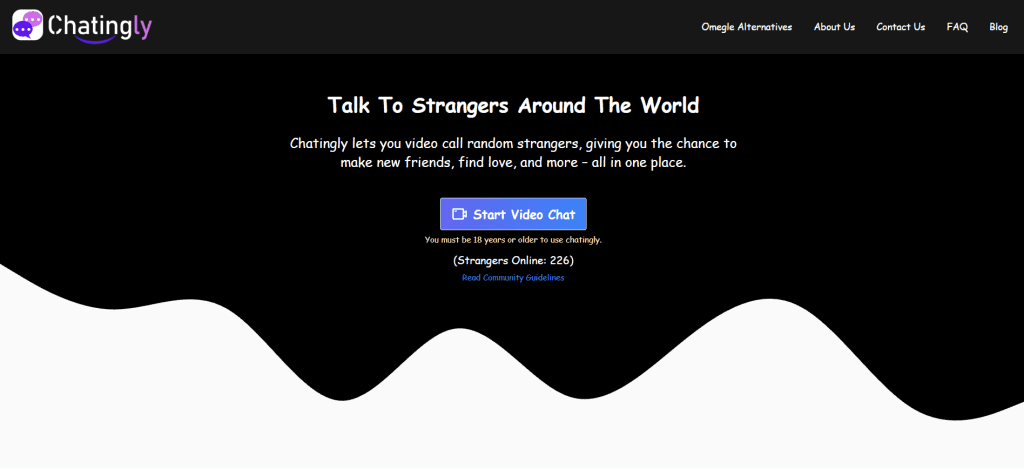
Chatingly is a platform-specific random video chat service that connects users to strangers for live one-on-one conversations. In simple terms, it is a chat with strangers platform that focuses on fast matching and short video interactions rather than profile-heavy social networking.
It is not best understood as a trhttps://randomchatty.com/wp-content/uploads/2024/12/multiethnic-team-using-green-screen-tablet-to-over-MVKF9J9.jpgional messaging app, and it is not a classic dating platform either. The main appeal is spontaneous conversation. A user opens the platform, starts matching, and can move from one person to another quickly depending on how the interaction goes.
That format attracts a wide range of users. Some join for casual entertainment. Some want to practice language skills. Others want a cam to cam chat experience that feels more immediate than text-only chat rooms. And some simply want an Omegle alternative that is easy to use without too much setup.
A clear way to frame it for readers: Chatingly is a live stranger-chat platform designed for quick interaction, not a long-term relationship app and not a private communication tool.
How This Chatingly Review Was Evaluated:
- Moderation strength
- Privacy/anonymity controls
- Pricing transparency
- Ease of use (mobile/desktop)
- Bot/spam prevention
- Filtering options (gender/location if relevant)
- Overall user safety
How Chatingly Works
Most random video chat platforms work through a similar loop, and Chatingly is generally described in that same style. A user opens the site or app-like interface, allows camera and microphone access, and starts a session that matches them with another person for live video conversation.
The experience is usually built around a simple sequence:
- Open the platform
- Allow camera and microphone permissions
- Start matching
- Connect to a stranger
- Continue chatting, skip, or end session
- Repeat if desired
That low-friction flow is the core selling point. It removes most of the barriers found on social apps and dating apps. Users do not need to build a polished profile just to test the experience. They can try one or two chats quickly and decide whether the platform fits what they want.
Still, easy access can also create bad habits. Users often click through permissions and jump into live video before checking where the block/report buttons are or what privacy options exist. On platforms like Chatingly, that first minute matters. The smartest approach is to treat the first session as a control check, not just a conversation.
Another practical point: platforms in this niche sometimes change layouts, domain versions, or feature availability over time. Users should verify they are on the correct Chatingly site and review visible terms, privacy notices, and controls before assuming the experience works the same as older screenshots or reviews.
Key Features and Standout Tools
Chatingly is usually judged on how well it handles the basics: speed, video stability, ease of skipping, and how quickly users can control the session. In random video chat, flashy marketing means very little if the core interaction feels clunky.
Below are the feature categories that matter most when evaluating platforms like this.
Quick one-on-one random matching
This is the foundation. The platform’s value depends heavily on whether users can connect fast and move on fast. If matching takes too long or the interface slows down when switching chats, the experience loses momentum.
Live webcam chat experience
Chatingly is generally used for live video interactions, which gives it a more direct social feel than text-only chat platforms. That makes conversations feel more real, but it also means users should be more careful about privacy, visible background details, and what they share in real time.
Low-friction access
Many users prefer random video chat platforms that do not require heavy onboarding. Chatingly is often discussed as a quick-start option, which appeals to people who want to test a stranger chat platform without a long sign-up process.
Skip/next flow for faster session control
A strong skip flow is one of the most useful tools in the niche. It lowers pressure, keeps the experience moving, and gives users a fast way out of awkward or low-quality chats without needing to explain themselves.
Basic safety controls (block/report)
These controls are not “bonus features.” They are essential. If Chatingly makes it easy to block and report users during or after a chat, that improves real-world usability more than almost any cosmetic feature.
A simple answer many readers need: the best random video chat platforms are not just the ones that connect fast—they are the ones that let users disconnect, block, and report even faster.
Is Chatingly Anonymous?
Chatingly may feel anonymous to users because conversations happen with strangers and the format is built around quick interactions, but users should be careful not to assume full anonymity in the strict privacy sense.
That distinction is important because “anonymous” is used loosely in this niche.
A platform can feel anonymous because:
- Users do not know each other personally
- Profiles may be limited or minimal
- Chats are short and disposable in feel
- Users can move on quickly without building contact history
But that does not automatically mean the platform collects no technical data or that users are invisible online. Like many internet services, a random video chat platform may process device data, session information, permissions, and activity signals depending on how it operates.
The safest mindset is this: Chatingly may offer stranger distance, but users should still behave as if anything shared on camera can expose them.
Practical privacy habits for safer use:
- Avoid sharing real name early in conversation
- Keep location clues out of the camera background
- Do not share phone number, email, or personal socials quickly
- Avoid discussing workplace, school, or daily routines
- Be cautious with links and external invites
- End the chat immediately when someone becomes pushy
Many privacy problems on random chat platforms do not start with hacking. They start with oversharing during a casual conversation.
Safety, Moderation, and Privacy Controls
Safety is one of the biggest reasons users compare one random video chat platform to another. A site can look clean and still have weak moderation. It can also have decent moderation tools that users never notice because they are hidden or poorly placed.
Chatingly should be judged the same way any stranger chat platform is judged: by how easy it is for a normal user to protect their experience in real time.
Live video moderation is difficult across the entire niche. Even platforms with active moderation systems can miss abuse, spam, inappropriate behavior, and repeat offenders. That is why users should aim for two things at once:
- A platform with visible safety tools
- Personal habits that reduce risk quickly
What users should check before using Chatingly for longer sessions:
- Is there a clear block button?
- Is reporting easy during an active chat?
- Can the user exit the session quickly?
- Are guidelines or platform rules visible?
- Are privacy or terms pages easy to access?
- Are permissions clearly explained?
A short direct answer that helps readers: if the platform makes it hard to find block/report tools, it becomes a weaker choice for beginners no matter how fast the matching is.
Privacy controls matter too. Users should check browser or device permissions (camera and mic), any visible profile settings, and whether the platform pushes account linking or external contact exchange. Small settings decisions can make a big difference in how exposed a user becomes.
It also helps to keep expectations realistic. Moderation may feel stronger at some times and weaker at others depending on traffic, region, and active user behavior. One clean session does not guarantee all sessions will feel the same.
Pricing, Payments, and Subscription Structure
Many users assume platforms in this niche are fully free, but the reality is often mixed. Chatingly may offer free access to basic random video chat features while limiting some filters, premium matching tools, or convenience options behind subscriptions, credits, or other paid systems depending on the current setup.
Because payment structures can change, users should verify pricing directly on the platform before purchasing anything. That includes checking:
- What is actually free vs limited
- Whether filters are included or paid
- If the platform uses tokens/credits
- Whether subscriptions auto-renew
- Billing frequency (weekly/monthly)
- Cancellation steps
- Regional pricing differences
This part matters more than many users expect. In the random chat niche, “free” can mean very different things. Some platforms are free in a genuinely usable way, while others are technically free to enter but highly restricted in practice.
A useful rule for readers: never pay just to “see if it gets better.” Test the free experience first. If the platform already feels stable, usable, and worth returning to, then paid features may be worth evaluating.
Users should also look for pricing transparency. A trustworthy platform should make it clear what a purchase unlocks and how long access lasts. If the offer is vague, rushed, or difficult to understand, caution is the smarter move.
User Experience (Mobile, Desktop, Sign-Up)
User experience often decides whether a random video chat platform becomes a repeat option or a one-time test. Even if the concept is good, users leave fast when camera permissions fail, buttons are hard to find, or the interface feels unstable.
Mobile experience
A large share of random video chat traffic comes from mobile users, so mobile usability matters. Chatingly should be easy to navigate on a phone, especially during live chats where users need quick access to session controls.
What users should test on mobile:
- Camera and mic permission behavior
- Page speed and loading stability
- Button size and placement
- Skip/end chat responsiveness
- Ease of finding block/report options
If a mobile layout feels cramped or inconsistent, it can become a safety problem as well as a usability issue.
Desktop experience
Some users prefer desktop for longer sessions, stronger webcams, or easier multitasking. Desktop can also make it simpler to see controls and manage browser permissions.
For desktop use, readers should check:
- Browser compatibility
- Camera/mic selection behavior
- Session stability
- Pop-up or permission confusion
- Visibility of safety controls
A random video chat platform does not need to be perfect on every device, but it should feel predictable. Unclear controls and unstable behavior reduce trust very quickly.
Sign-up and access flow
One reason users try platforms like Chatingly is the low-friction experience. Quick access is a strength. But the best version of “quick access” is not blind access. Users should still spend a few seconds checking what is being requested before starting.
Before the first chat, users should confirm:
- Which permissions are required
- Whether sign-up is optional or required
- What visible profile info appears
- How to leave the session quickly
- How to block/report users
A platform can be fast and still safe enough for casual use if users understand the controls before the first match.
Pros and Cons
Chatingly, like every random video chat platform, has strengths and trade-offs. The best way to evaluate it is to compare its convenience and chat speed against the usual risks and limitations of stranger chat environments.
Pros
- Fast random video chat concept with low friction
- Easy for users who want quick one-on-one conversations
- Stranger matching format feels more immediate than profile apps
- Usually simple enough for first-time random chat users
- Can work as a casual Omegle alternative-style option
Cons
- Random chat always involves moderation and safety risk
- “Anonymous” feel may create false confidence
- Match quality can vary widely by time and traffic
- Free features may be limited depending on platform version
- Not ideal for users wanting structured communities or long-term connection tools
A practical takeaway: Chatingly can be useful for fast, casual cam-to-cam chats, but it should be approached as a high-variability platform where user caution matters as much as platform design.
Chatingly vs Alternatives
Chatingly competes with a wide range of random video chat platforms that may look similar in concept but differ a lot in actual experience. Some focus on speed. Some focus on filters. Some feel more app-like. Others stay closer to classic roulette chat behavior.
The best comparison method is simple: match the platform to the user’s priority.
If the user wants quick conversations with minimal setup, one type of platform fits. If the user wants more filters or a more structured environment, a different option may make more sense. This is why direct “best platform” claims often miss the real question.
Common alternatives users compare in this niche include:
OmeTV
Often chosen for fast one-on-one video chats and a familiar, mainstream random chat experience. Good for users who prioritize quick switching and simple flow.
Chatspin
Frequently discussed when users want roulette chat plus optional filters. It can appeal to users who want a lightweight interface with added matching control.
Camsurf
Often recommended for users who care about moderation feel and a cleaner environment. It may suit people who want fewer chaotic sessions.
Camgo
Usually considered a low-friction option for quick stranger chats. Good for users who want simple access without a complicated interface.
Emerald Chat
A common choice for users who want more structure than pure roulette-style chat. Interest-based elements and community-style features can improve conversation fit for some users.
Joingy
Useful for users who like the option to begin with text and switch to video later. This flexibility can help reduce pressure, especially for new users.
Shagle
Known for broad random video chat usage and more matching controls. It often attracts users who want filter-heavy functionality, though some tools may be paid or limited.
Room-based chat platforms
These are better for group interaction than strict one-on-one matching. They are not direct clones of Chatingly, but they can be a better fit for users who dislike roulette-style sessions.
The main point: Chatingly is likely to appeal most to users who want fast, minimal, one-on-one random chat rather than profile-heavy social networking or group chat communities.
Comparison Table: Chatingly vs Other Platforms
| Platform | Best For | Free Version |
Moderation | Key Advantage |
|---|---|---|---|---|
| Chatingly | Quick one-on-one random video chat | Yes (check current limits) | Medium | Fast access and simple stranger matching |
| OmeTV | Mainstream random 1-on-1 chats | Yes | Medium | Familiar flow and quick switching |
| Chatspin | Roulette chat + optional filters | Yes (limited) | Medium | Flexible chat options |
| Camsurf | Users prioritizing safer feel | Yes | Medium–Stronger | Cleaner experience and visible reporting tools |
| Camgo | Low-friction random cam chat | Yes | Medium | Easy start and minimal setup |
| Emerald Chat | More structured matching | Yes (limited) | Medium–Stronger | Interest-based matching features |
| Joingy | Text + video random chat | Yes | Medium | Start with text, then switch to video |
| Shagle | Filter-focused random video chat | Limited / Paid features | Medium | More matching controls for advanced users |
This table is a starting point for comparison, not a permanent ranking. User experience changes with traffic quality, moderation consistency, device type, and regional activity.
FAQs: Chatingly
1. Is Chatingly free to use?
Chatingly is often presented as free to start, but users should check current feature limits and any paid upgrades directly on the platform before assuming all tools are included.
2. Is Chatingly a dating platform?
Chatingly is better described as a random video chat platform than a trhttps://randomchatty.com/wp-content/uploads/2024/12/multiethnic-team-using-green-screen-tablet-to-over-MVKF9J9.jpgional dating app. Some users may flirt, but the core format is quick live conversations with strangers.
3. Is Chatingly anonymous?
It may feel anonymous because users connect with strangers quickly, but users should not assume full privacy. It is safer to treat it as low-profile stranger chat, not true anonymity.
4. Is Chatingly safe?
Like other random video chat platforms, safety depends on moderation quality and user behavior. Users should locate block/report tools early and avoid sharing personal details.
5. Does Chatingly require sign-up?
Some platforms in this niche offer quick access with little friction, while others require some form of account or setup. Users should verify the current Chatingly flow before starting.
6. Can Chatingly be used on mobile?
Many users expect mobile compatibility in this category. The best approach is to test the platform directly on a phone and confirm camera, mic, and control stability.
7. Does Chatingly work on desktop?
Desktop support can vary by platform design and browser setup. Users should check camera permissions, browser compatibility, and control visibility before long sessions.
8. Does Chatingly have a report feature?
A usable random video chat platform should provide report and block tools. Users should confirm where these controls are before continuing with extended use.
9. Are bots common on Chatingly?
Bots and fake behavior can appear on many stranger chat platforms. Users should be cautious if someone quickly sends links, asks for money, or pushes off-platform contact.
10. Is Chatingly better than OmeTV?
That depends on user priorities. Some users prefer a more mainstream familiar flow, while others prefer a simpler quick-start experience with fewer layers.
11. Can users choose gender or location on Chatingly?
Some random video chat platforms offer filters, but availability may vary and certain options may be paid. Users should confirm current settings directly on the platform.
12. Should users pay for Chatingly features?
It is usually smarter to test the free version first. Paid features are only worth considering if the platform already feels useful and the upgrade clearly adds value.
13. Is Chatingly suitable for younger users?
Random video chat platforms can expose users to inappropriate behavior, spam, or scams. Parents and guardians should be cautious and review platform suitability carefully.
14. What should users never share on Chatingly?
Users should avoid sharing full name, address, phone number, personal social accounts, workplace, school details, or anything that reveals identity too quickly.
15. What should users do if a chat feels unsafe?
End the chat immediately, use the block function, and report the user if the platform provides reporting tools. Fast action is the safest response on stranger chat platforms.
Final Verdict: Chatingly
Chatingly is a practical option for users who want a fast, simple random video chat experience focused on one-on-one conversations with strangers. Its main strength is convenience: quick access, easy matching, and a straightforward cam-to-cam chat flow that fits users who do not want profile-heavy social apps.
At the same time, it should be approached with realistic expectations. Random video chat platforms always carry moderation risk, session quality can vary, and “anonymous” branding should never be treated as a guarantee of privacy. The smartest users test the controls first, keep personal details private, and treat the free experience as a trial before spending money.
For readers comparing stranger chat platforms, Chatingly makes the most sense as a casual, quick-start option rather than a long-term social network or a privacy-first communication tool. Used carefully and with solid boundaries, Chatingly can be a useful platform for random video chat.